AI agent
Spa chatbot: who books the 11pm WhatsApp customer?
The Ecbot team ·
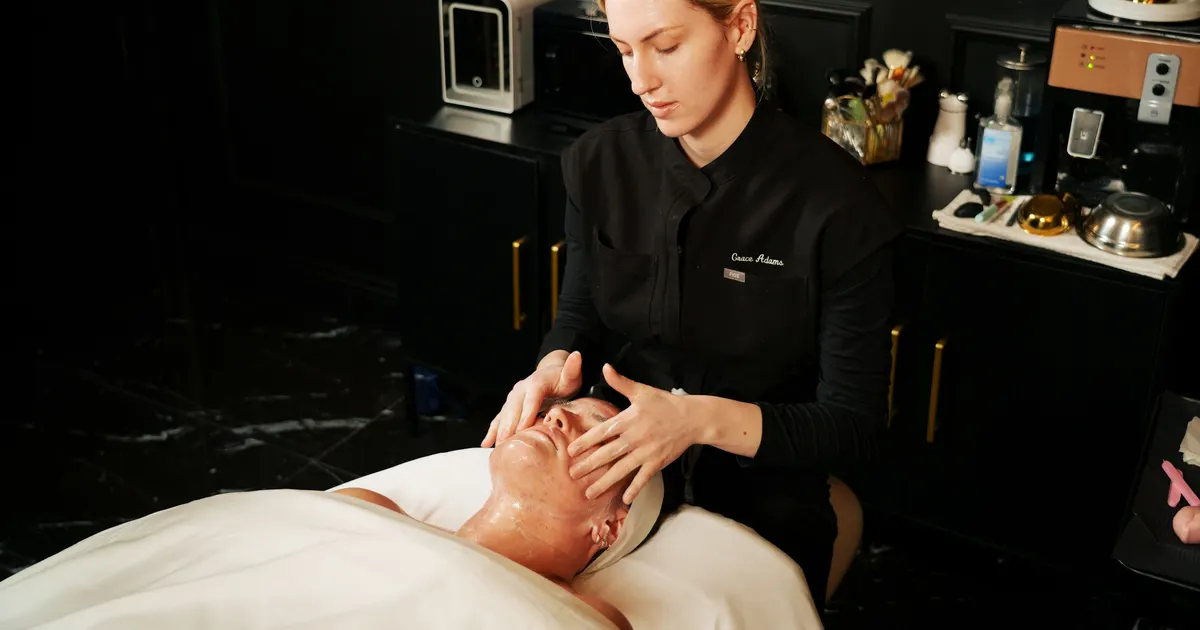
A spa chatbot worth paying for answers the 11pm  WhatsApp question about price, finds a free slot and books it, then hands skin reactions to staff. Spa management software keeps your appointments, client records and treatment packages, but it does not reply to chats. If a price question waits until morning, that customer may already have booked somewhere else.
Picture a beauty spa in Kuala Lumpur. At 10:47pm on a Thursday, its WhatsApp Business number gets this:
hi how much for underarm laser? got slot tmr 7pm?
The front desk went home at 9. The spa management software knows that bed 2 is free tomorrow at 7pm, but nobody is there to open it and reply. When staff answer at 10 the next morning, the customer has stopped replying.
What spa management software is good at
Good spa, salon or beauty clinic software handles six jobs at the front desk and behind it:
- Appointments per therapist, bed or chair, so nothing gets double-booked.
- Client records: phone number, treatment history, notes on skin, hair or allergies.
- Packages and prepaid cards: how many of the 10 sessions are used, how much credit is left.
- Staff: shifts, commission per service, sales per person.
- Stock of products for treatments and retail.
- Payments and reports by day and by branch.
It does all of this far better than a notebook or a spreadsheet. But every one of these jobs starts after the customer has already booked with you.
Five questions to ask before you choose spa management software
1. Does it schedule by person or by bed?
Spas and beauty clinics are usually limited by beds and machines. Hair and nail salons are limited by how many stylists or technicians are on shift. Pick software that schedules around whatever actually caps the number of customers you can take in a day.
2. Does it track packages and prepaid cards?
If you sell a 10-session laser package or top-up cards, the software should deduct a session or the credit after each visit. Without that, staff dig through records every time a customer asks "how many sessions do I have left?".
3. Is it quick with walk-ins?
For nail and hair salons, look at how fast the salon booking software creates a bill for a walk-in, how it prices add-ons like gel or nail art, and how it splits commission when two technicians work on one customer.
4. Does it have an API or calendar sync?
This answer decides whether you can automate bookings later. Ask the vendor whether other tools can read free slots and create appointments through an API, or whether it syncs both ways with  Google Calendar. If the answer is no, every booking that starts in a chat has to be typed in by hand.
5. Who answers the price and availability questions?
Spa management software waits for the front desk to enter a booking. It does not talk to customers. Count how many messages reach you on WhatsApp,  Messenger or
  Zalo after closing time each evening, and who answers them today.
Spa chatbot, software and staff: who does what
Question five shows that a booking that starts in a chat needs three parties. Here is how the work splits (as of October 2026):
| Task | Spa management software | AI receptionist in your inbox | Staff |
|---|---|---|---|
| Hold appointments, avoid double-booking | Core job | Reads and writes through a connected tool | Check and edit |
| Answer prices at 11pm | No | Yes, from the price list you upload | If still awake |
| Find a free slot and book inside the chat | No | Yes, through a tool you connect | Yes, when on shift |
| Track packages and prepaid cards | Yes | Only if the software has an API | Yes |
| Complaints, skin reactions, refunds | No | Hands the chat to staff | Decide |
| Appointment reminders, post-treatment check-ins | Depends on the software | Follow-ups in the chat (not synced with the software) | By hand |
When nobody covers the middle column, every after-hours price question and booking request waits until the next morning.
The 10:47pm message, with an AI agent on shift
Back to the customer asking about underarm laser. This time the spa has connected an AI agent to its calendar, and the chat goes like this:
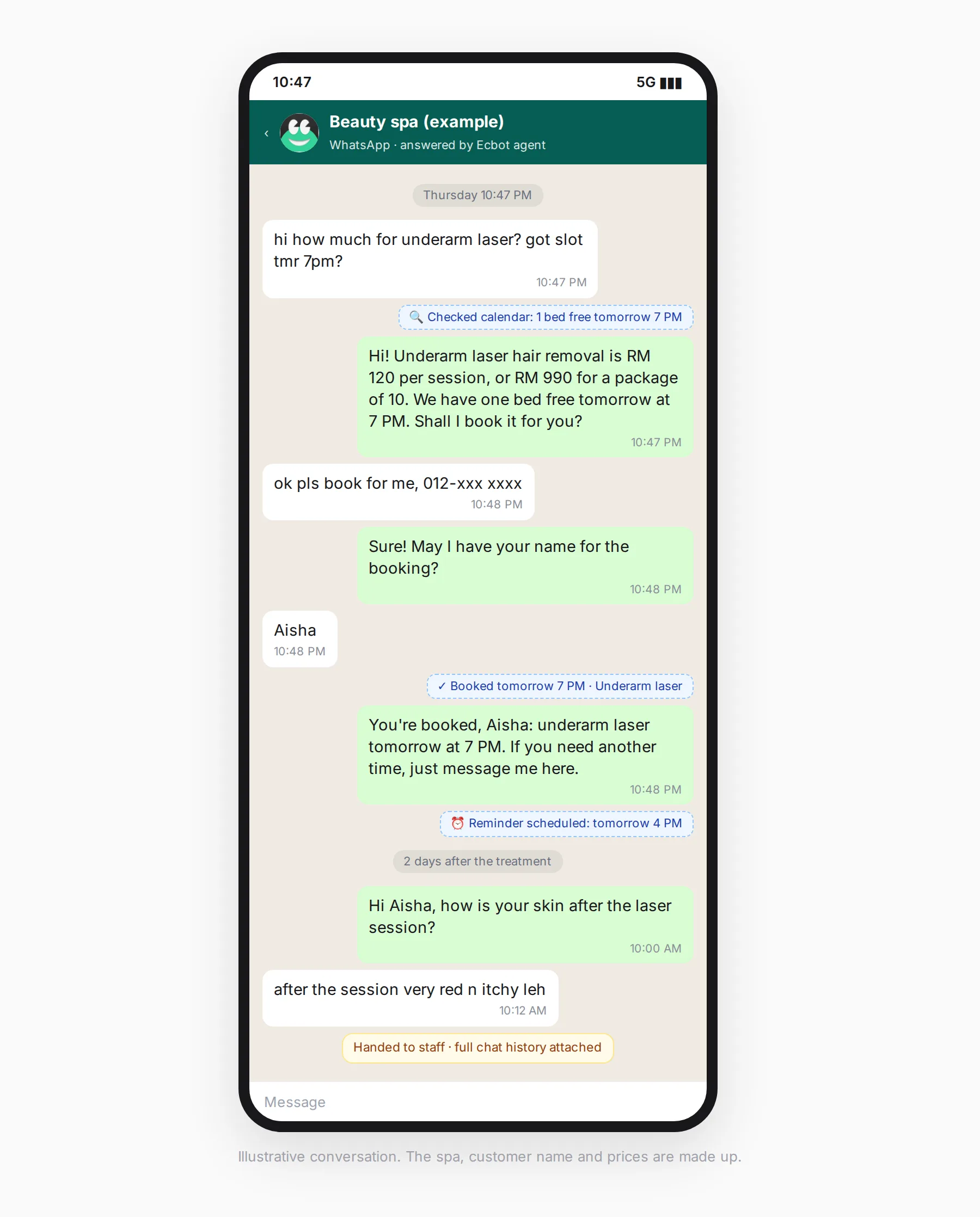
The prices are examples. The agent takes them from the price list you upload and does not guess. To know that 7pm is free, it calls the calendar tool you connected and creates the appointment there. Every tool call is logged, so in the morning you can see which slots the agent checked and what it booked.
If you set a follow-up rule such as "remind the customer 3 hours before the appointment" (you choose the timing), Aisha gets a reminder at 4pm the next day. A rule such as "check in 2 days after a treatment" sends her a message asking how her skin is. When a follow-up fires, the agent rereads the conversation and writes a fresh message that fits what has happened since, instead of sending a fixed template. If the conversation was marked resolved or you turned the agent off, the follow-up is skipped.
When Aisha replies "after the session very red n itchy leh", the agent does not give skin advice. You wrote a guardrail for redness, itching and reactions and set it to hand the chat to staff when it blocks, so the agent stops replying and passes the conversation to your team with the full history.
Many spa chatbots are scripted, and a scripted chatbot cannot book that slot, because it has no way to check a calendar. AI agent vs chatbot: what is the difference? explains why.
Where Ecbot sits next to the software you already use
Ecbot is an AI agent that sits in front of your spa management software, and you keep that software. One setup lets the agent answer customers on WhatsApp, Messenger, Zalo,  Telegram and your website chat, so it also works as a salon chatbot for hair and nail salons.
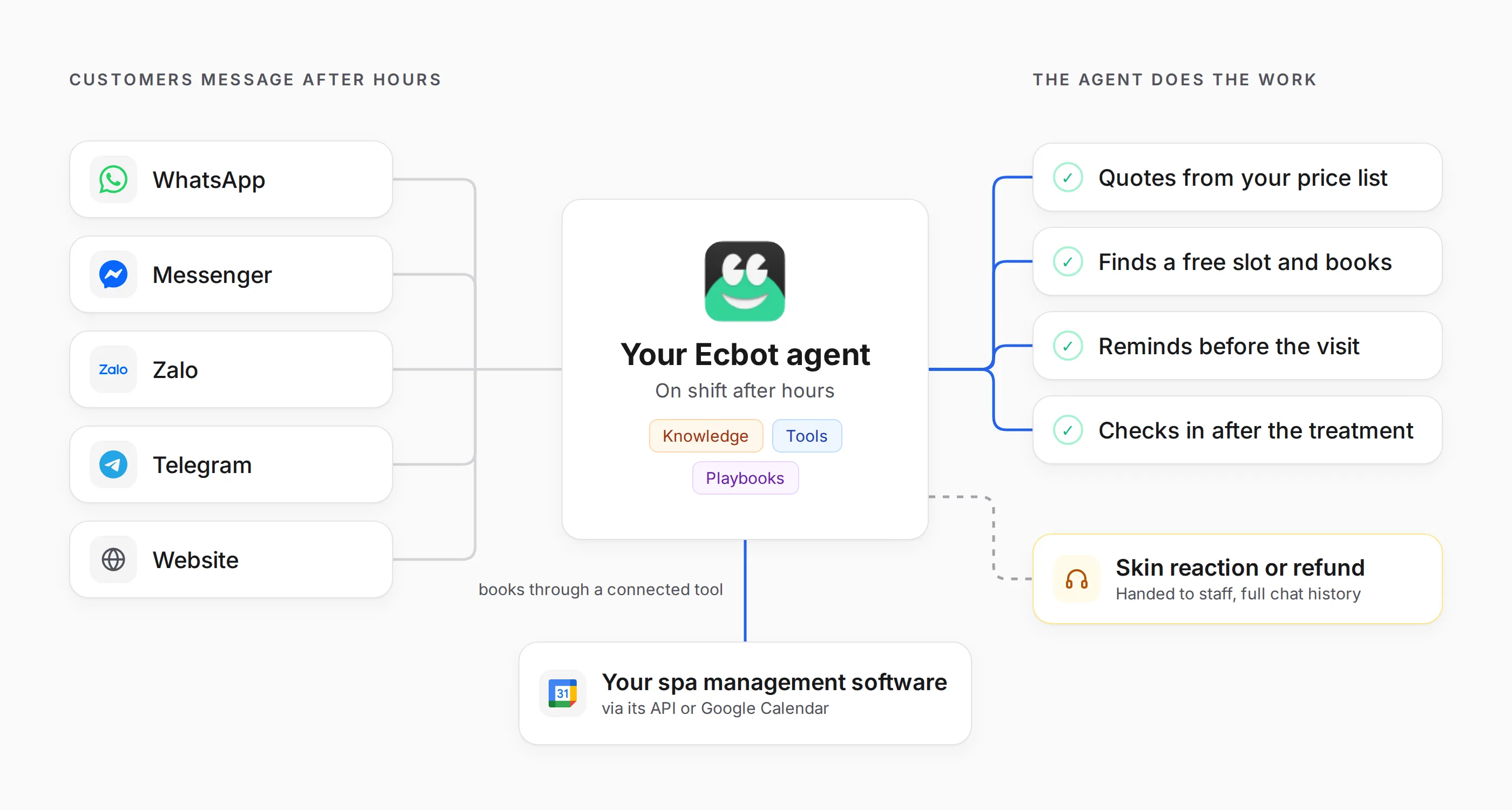
- Answers from your documents. You upload your price list, service menu and cancellation policy. Ecbot stores them in its database next to customer profiles and chat history; if you self-host Ecbot, that is your own database.
- Books through the tools you connect. The agent checks free slots and creates appointments through a tool you connect, such as your spa software's API (REST or MCP) or Google Calendar through
 Composio. Every tool call is logged.
 - Reminders and check-ins with follow-ups. The agent schedules a message to the same customer on the same channel, from 1 minute to 30 days ahead, with at most 5 pending per conversation. The customer can ask ("remind me the day before") or you set rules, such as a reminder 1 day before the appointment, a deposit reminder, or a check-in 2 days after a treatment. Follow-ups are not synced with the calendar in your spa management software, so when staff move an appointment there, tell the customer the new time in the same chat so the agent can read it. The follow-ups docs show how to set them up.
- Playbooks for each situation. You write the steps once, for example "customer wants to reschedule: ask for name and phone number, find the booking, offer the two nearest free slots". The agent opens a playbook only when a conversation needs it.
- Your staff stay in charge. The agent hands the chat to staff when the customer asks for a person, when a message contains a keyword you listed, when it has to say "I don't know" several times in a row, or when a guardrail blocks a message. For a guardrail, you write an instruction for the AI classifier in plain words, such as "customer reports a skin reaction, a complaint or asks for a refund", and set it to hand over when it blocks. The classifier can miss a message, so add keywords as a backup. Staff reply from the same inbox, in the same conversation.
- One customer, one profile. A customer who messages on WhatsApp today and on Messenger next week is still one person. When two profiles share a phone number, Ecbot suggests a merge and staff confirm it, so the agent sees the full history, notes and tags.
- No dropped messages. Each message is saved before it is processed, so a server restart halfway through does not lose the reply.
- Set up from one sentence. Describe your business, such as "facial and laser spa in Petaling Jaya, customers book on WhatsApp and our
 Facebook page", and Ecbot suggests a tone, goals and rules for you to edit.
The Ecbot for spa and wellness page has more on this use case.
When you don't need an AI agent yet
Not every spa or salon needs one. You can probably wait if:
- You get a handful of messages a day and the front desk answers them during opening hours.
- Most customers book by phone or walk in, not by chat.
- Your prices change customer by customer after a skin consultation. The agent answers well only when it has a clear price list to work from.
- You have no calendar the agent can read: your software has no API and you don't want to use Google Calendar. The agent can then only take details and pass them to staff, so the main gain is answering prices after hours.
How to start
- Keep the spa management software you use and ask the vendor whether it has an API or Google Calendar sync.
- Gather your price list, service menu, cancellation and rescheduling policy, plus the 20 questions customers ask most in your inbox.
- Write guardrails and handoff keywords for complaints, skin reactions and refunds, then set follow-ups for reminders and post-treatment check-ins.
- Test with old customer messages, including the short, typo-heavy ones, before you switch it on for WhatsApp or your Facebook page. Include messages about reactions to see whether the guardrail catches them.
If you are not sure what an AI agent does beyond replying, What is an AI agent? explains it with chat-selling examples. When you are ready, try Ecbot, connect your spa's WhatsApp number and test it with your own 11pm messages.
Frequently asked questions
Does spa management software reply to customers on WhatsApp or Messenger?
Most spa management software focuses on appointments, client records, treatment packages, staff and payments. Replying to price and availability questions on WhatsApp or Messenger is usually still done by hand. An AI agent such as Ecbot can sit in front of that software, answer those chats and book through a tool you connect.
How is salon booking software for a nail or hair salon different from spa software?
Nail and hair salons usually have short services, several staff working in parallel, many walk-ins and add-ons priced one by one. When you compare salon booking software, check that it schedules by staff member, splits commission by service and handles a walk-in in a few taps.
Can a spa chatbot book straight into my spa management software?
Yes, if the software has an API to read free slots and create appointments. The agent books through the tool you connect, for example your system's API or Google Calendar through Composio, and every call is logged. If no calendar is connected, the agent takes the details and hands them to staff to confirm.
Can Ecbot send appointment reminders?
Yes, with follow-ups. You set rules such as a reminder 1 day before the appointment or a check-in 2 days after a treatment, and the agent sends them on the channel the customer used. Follow-ups live in the chat and are not synced with your spa management software, so if staff move an appointment there, the reminder does not know.
What happens when a customer reports a skin reaction after a treatment?
You write a guardrail, for example: if a customer describes redness, itching, swelling or a reaction after a treatment, do not advise, and set it to hand the chat to staff when it blocks. Keywords like "reaction" and "refund" add a backup. The agent then stops replying and the chat lands in your staff inbox with the full history.