AI agent
Meet Ecbot, the AI agent that takes the order
The Ecbot team ·
Ecbot is an open-source AI agent for shops that sell in chat. It answers customers from your own documents, checks stock, creates the order and hands hard chats to your staff. One agent covers  Messenger,
  Zalo,
Zalo,  WhatsApp,
  Telegram and your website, and the video above shows the whole setup in 80 seconds.
Why we built it
A customer writes at 11pm: "white linen dress in M? ship to District 7?"
A scripted chatbot looks for the keyword "shipping". The customer typed "ship", so the message falls through to the fallback, and the bot replies "Please choose an option 👇". The customer wanted two answers and got a menu. The fix in most chatbot tools is another branch in the script, and then another one for the next way people ask.
We built Ecbot so the shop writes down what it knows once and the agent works out the reply. In the video, the same message gets the stock, the price and the shipping fee in one answer, then an order.
Why Ecbot
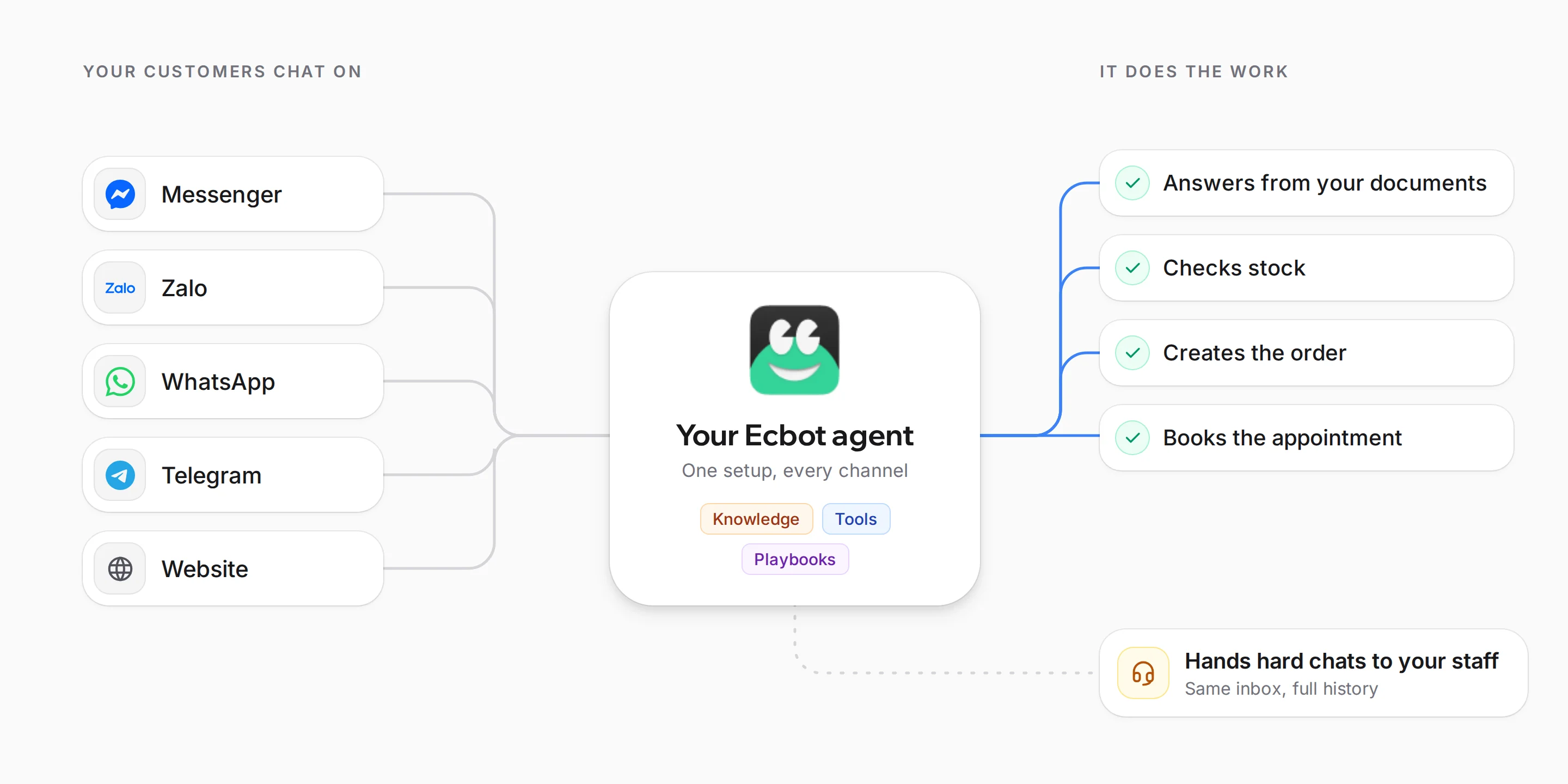
- One agent on every channel. Set it up once. The same knowledge, tools and playbooks answer on Messenger, Zalo, WhatsApp, Telegram and your website.
- An agent that does the work. It looks up products, creates orders and books appointments inside the chat, through your REST endpoints, any MCP server or a marketplace toolkit. Ecbot logs each call so you can see what it did.
- Playbooks the agent loads on demand. You write procedures in markdown, such as how to handle an exchange. The agent reads one only when a conversation needs it, which keeps its replies on track.
- Your staff stay in charge. The agent hands off when the customer asks for a person, when its confidence drops below your threshold, when a guardrail blocks a message, or when it tags the customer with a label you mark as urgent, such as "Angry". Your staff reply from the same inbox, with the full conversation.
- One customer across every app. Ecbot keeps one profile per person, with their Messenger, Zalo and Telegram identities attached. When two profiles share a phone number or email, it suggests a merge for your staff to confirm.
- No dropped messages. Each incoming message is written to a durable queue before Ecbot acknowledges it, so a restart halfway through a reply does not lose it.
- Set up from one sentence. Describe your shop and the agent builder drafts the persona, tone, goals and rules for you to edit.
- Open source, with nothing held back. Self-hosted Ecbot has every feature of Ecbot Cloud, and your knowledge sits in your own Postgres database.
Set up an agent in six steps
1. Describe your shop
Write one sentence about your business. The agent builder reads it and fills in the questions for you: what you sell, what the agent should do (answer product questions, take orders, check order status) and how it should sound. You only answer what it could not guess, such as your shipping fees.
2. Add your knowledge
Paste your policies, add your FAQ page or upload a file such as a size guide. The agent answers from these documents. Ecbot stores them in Postgres with pgvector and scopes them to each agent, so self-hosted, your knowledge stays in your own database.
3. Connect your systems
This is where an agent starts doing work instead of only answering. You can:
- Describe a REST endpoint (an HTTP tool), and the agent calls it with structured arguments.
- Paste the URL of an MCP server, and Ecbot discovers its actions for you. In the video there are six:
get_order,list_orders,check_stock,update_stock,create_invoiceandget_customer. - Install a toolkit from the
 Composio marketplace, such as
  Google Sheets,
  Shopify,
  HubSpot,
  Salesforce,
  Odoo or
  QuickBooks.
Every call is logged with its arguments and timing, so you can check what the agent did.
4. Teach it playbooks
Some situations need a procedure. You write it as a playbook in markdown, for example:
# Handle an exchange
1. Apologise, then ask for the order code.
2. Ask for a photo of the item with the tag still on.
3. Exchanges are free within 7 days of delivery.
4. Past 7 days or no tag: hand the chat to the team.
The agent sees only each playbook's name until a conversation needs it. When a customer asks "Can I exchange this dress? It's too small.", it loads this one and follows it. That reply in the video came from a real run.
5. Connect your channels
Connect your  Facebook page, Zalo OA, WhatsApp number, Telegram bot and the website widget. The same agent, with the same knowledge, tools and playbooks, answers on all of them. There is also a REST API channel for your own app.
6. Test it before customers do
The test chat shows every step the agent takes. In the video, it calls check_stock on the shop's MCP server (1.8 seconds), answers with the price and shipping fee, then calls create-order over HTTP (1.0 second) when the customer sends their details. Order LC-1044, 415k with shipping.
Open source, or let us run it
Ecbot is open source under AGPL-3.0 at github.com/blackmouse572/ecbot. Self-hosted, it has every feature of the cloud version. You bring an AI key and, for Facebook and Zalo, your own approved platform app.
Ecbot Cloud runs the servers, the AI models and the approved Facebook and Zalo apps for you. It is in beta, starting with shops in Vietnam.
If you want to stop writing a script for every question, join the waitlist at ecbot.dev.
Frequently asked questions
What is Ecbot?
Ecbot is an open-source AI agent for businesses that sell and support customers in chat. One agent answers on Messenger, Zalo, WhatsApp, Telegram and your website, from your own documents. It checks stock, creates orders through the tools you connect, and hands the chat to your staff when your rules say so.
Do I need to code to set up Ecbot?
No. You describe your business in one sentence and the agent builder drafts the goals, rules and tone for you to edit. You upload your policies and price list, connect your systems from a form or the marketplace, and connect your channels. Self-hosting is optional and meant for developers.
Will the agent say wrong things to my customers?
It answers from the documents you give it, guardrails screen messages in both directions, and it hands the chat to a person when the customer asks, when its confidence is low, or when a rule you set matches. Test it in the test chat with real customer messages before you switch on a channel.
Is Ecbot free?
The code is open source under AGPL-3.0, and self-hosted Ecbot has every feature Ecbot Cloud has; you pay your AI provider directly. Ecbot Cloud, where we run the servers and the approved Facebook and Zalo apps for you, is in beta. Join the waitlist at ecbot.dev.
Which systems can the agent use?
Any REST endpoint you describe, any MCP server (its actions are discovered automatically), and toolkits from the Composio marketplace such as Google Sheets, Shopify, HubSpot, Salesforce, Odoo and QuickBooks. Ecbot logs every call, so you can see what the agent did in each conversation.